
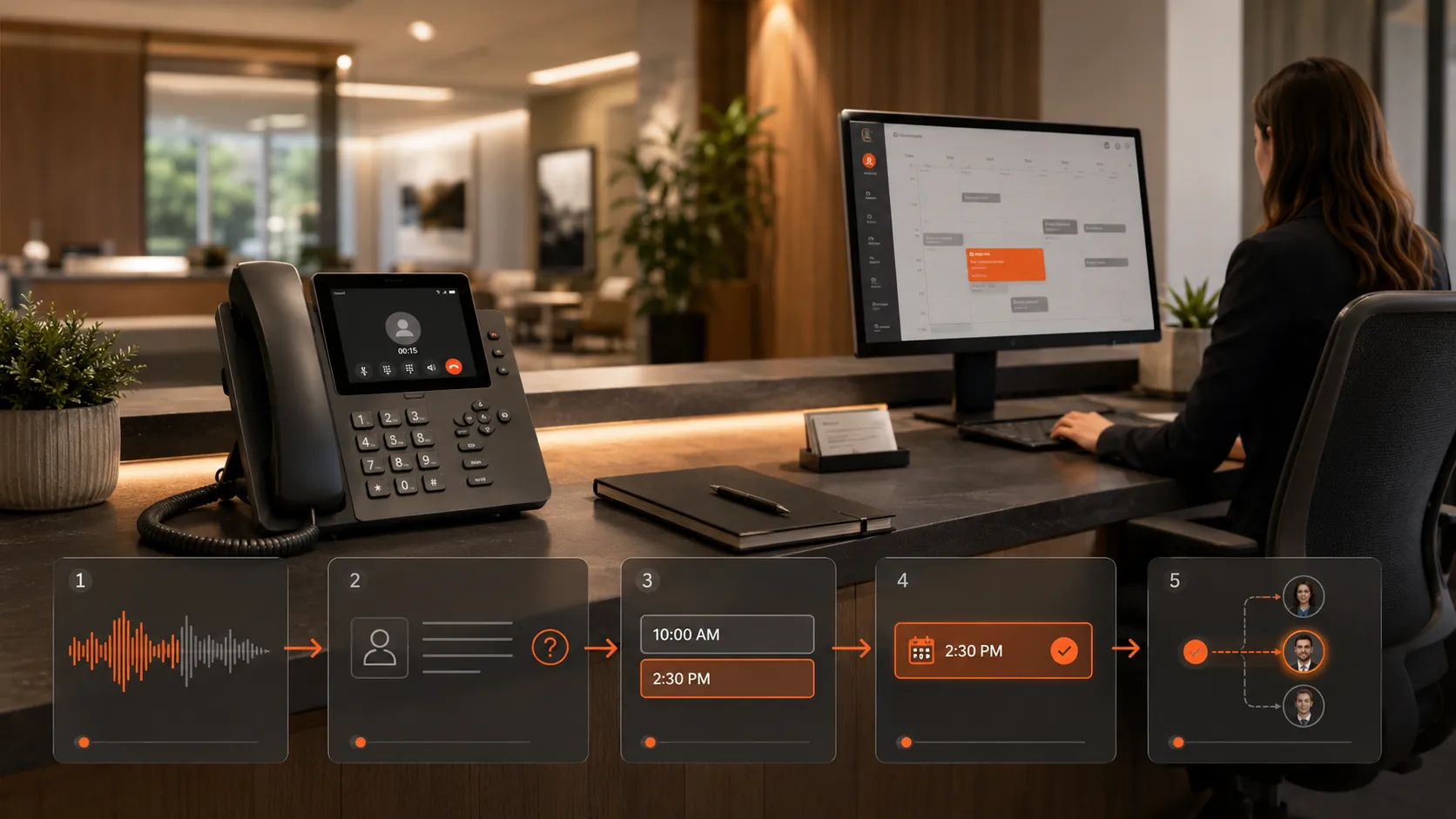

Every customer call creates an opportunity for a business. A caller may want to ask a question, request a quote, book an appointment, change an existing reservation, or speak with a specific team member.
The challenge is that businesses cannot always answer every call immediately. Employees may be serving customers, attending meetings, working outside the office, or handling several enquiries at once. Calls that arrive after business hours may remain unanswered until the following day.
When callers cannot quickly reach the right person or complete the action they need, they may leave a voicemail, postpone their decision, or contact another business.
AI voice agents help businesses manage these situations by answering customer calls, understanding the purpose of each conversation, providing approved information, and completing routine actions such as appointment booking.
Instead of forcing callers to navigate a rigid telephone menu, an AI voice agent can communicate through natural conversation. The caller explains what they need, and the system determines the correct next step.
For appointment-based businesses, this can make the entire process faster and more organised, from the first enquiry to booking confirmation and follow-up reminders.
What Is an AI Voice Agent?
An AI voice agent is a software-based assistant that communicates with customers over the phone.
It uses speech recognition to understand what the caller says and conversational technology to generate an appropriate response. The agent follows business-specific instructions, call flows, scripts, and knowledge provided during setup.
An AI voice agent may be configured to:
- Answer incoming calls
- Identify the reason for the call
- Respond to frequently asked questions
- Collect customer information
- Qualify new enquiries
- Check appointment availability
- Book, reschedule, or cancel appointments
- Route calls to the correct employee
- Send details to a calendar or CRM
- Create call summaries and transcripts
- Make appointment confirmation or reminder calls
The exact workflow depends on how the business operates and what it wants the AI agent to manage.
How an AI Voice Agent Handles an Incoming Customer Call
A properly designed AI voice agent follows a structured process during each conversation. Although the customer experiences a natural call, the system is working through a series of business rules in the background.
1. Greeting the Caller
The conversation begins with a clear and professional greeting.
The voice agent may introduce the business, identify itself as an automated assistant where appropriate, and ask how it can help.
For example:
“Thank you for calling. How can I assist you today?”
This gives the caller freedom to describe the reason for the call instead of selecting from a long list of numbered options.
The greeting can be customised according to the business, department, campaign, location, or time of day.
A company may use different greetings for:
- New customer enquiries
- Existing customer support
- Appointment scheduling
- After-hours calls
- Sales campaigns
- Multiple business locations
The opening message should be short, clear, and aligned with the company’s communication style.
2. Understanding the Caller’s Intent
After the greeting, the AI voice agent listens to the caller’s request.
A caller might say:
- “I want to book an appointment.”
- “Do you serve my area?”
- “I need to change my booking.”
- “Can I speak with someone from sales?”
- “I have a question about your services.”
- “I missed a call from your company.”
The system identifies the intent behind the request and selects the relevant workflow.
This is an important difference between an AI voice agent and a traditional phone menu. The caller does not need to know which department handles the issue. The AI can determine the appropriate action from the conversation.
When the request is unclear, the agent can ask a follow-up question.
For example:
“Are you calling to schedule a new appointment or change an existing one?”
This helps the system collect the correct information without making the caller restart the conversation.
3. Collecting Customer Information
Once the reason for the call is understood, the voice agent can collect the details needed to complete the request.
Depending on the business, this may include:
- Customer name
- Telephone number
- Email address
- Preferred service
- Location or postcode
- Existing booking reference
- Preferred appointment date
- Preferred time
- Additional notes
- Reason for the appointment
The agent can repeat important details to confirm accuracy.
For example:
“I have your preferred appointment as Tuesday at 2:30 PM. Is that correct?”
This confirmation step can reduce incorrect bookings and incomplete customer records.
The system should request only the information needed for the conversation. Sensitive details should not be collected unless the workflow, technology, security controls, and applicable requirements support that use.
4. Answering Common Questions
Customers often ask questions before booking an appointment.
They may want to know:
- Which services are available
- Whether the business serves their location
- How long an appointment takes
- What documents they need
- Whether weekend appointments are offered
- What the cancellation policy is
- Whether a particular service is suitable
- What happens after booking
The AI voice agent can answer approved questions using the information provided by the business.
This allows customers to receive immediate answers without waiting for an employee. It also helps ensure that callers receive consistent information.
When a question is outside the approved knowledge base, the agent should not invent an answer. It can transfer the caller, create a callback request, or explain that a team member will provide further assistance.
Businesses can explore call answering, routing, booking, lead qualification, and related solutions on the CallAutomateAI services page.
How AI Voice Agents Book Appointments
Appointment booking is one of the most practical applications of AI call automation.
The process can be designed around the company’s real availability, services, staff, locations, and scheduling rules.
5. Identifying the Required Service
Before checking the calendar, the agent may need to understand what type of appointment the caller requires.
For example, a clinic may offer consultations and follow-up visits. A home-service company may provide inspections, repairs, and installations. An agency may offer introductory calls and strategy sessions.
Different services may require different appointment durations, employees, locations, or preparation instructions.
The AI voice agent can ask:
“What type of service would you like to schedule?”
The caller’s answer determines which availability should be checked.
6. Checking Calendar Availability
When the AI voice agent is connected to a supported calendar or scheduling system, it can check available time slots during the call.
The workflow may consider:
- Business hours
- Employee availability
- Appointment duration
- Service type
- Location
- Travel time
- Existing bookings
- Break periods
- Booking notice requirements
- Maximum daily appointments
The agent can then offer suitable options.
For example:
“I have Tuesday at 2:30 PM or Wednesday at 9:00 AM available. Which time works better for you?”
The caller can select an option naturally without leaving the phone call to open a separate booking page.
7. Confirming the Appointment
After the caller chooses an available time, the AI voice agent confirms the booking details.
A confirmation may include:
- Selected service
- Appointment date
- Appointment time
- Location or call method
- Customer name
- Important preparation instructions
The agent may say:
“Your consultation is confirmed for Wednesday at 9:00 AM. You will receive the appointment details using the contact information provided.”
The appointment is then added to the connected calendar or scheduling system.
This reduces manual data entry and gives the business a more consistent booking process.
8. Handling Rescheduling Requests
Customers frequently need to move an existing appointment.
Without automation, an employee must find the booking, ask for a new preferred time, check the calendar, and update the schedule manually.
An AI voice agent can guide the customer through the same process.
It may:
- Ask for identifying information.
- Locate the relevant appointment.
- Confirm which booking should be changed.
- Check alternative time slots.
- Offer available options.
- Confirm the new appointment.
- Update the connected calendar.
The previous time slot may then become available for another customer.
This creates a faster experience for the caller and reduces administrative work for the team.
9. Managing Appointment Cancellations
The AI voice agent can also process cancellation requests according to the business’s approved rules.
It can confirm the appointment details, ask whether the caller wants to cancel or reschedule, and update the schedule.
Where appropriate, the agent may explain relevant cancellation policies or offer alternative dates.
For example:
“Would you like to cancel the appointment completely, or would you prefer to choose another time?”
Giving customers an easy rescheduling option may help the business retain appointments that would otherwise be lost.
How AI Voice Agents Handle Calls That Need Human Support
Not every customer conversation should be fully automated.
Certain calls may involve complex questions, complaints, urgent matters, negotiations, or sensitive situations. A good call flow includes clear rules for recognising when human assistance is required.
10. Smart Call Routing
The AI voice agent can route calls based on the customer’s request and the information collected during the conversation.
A new sales enquiry may be sent to the sales team. An existing customer may be routed to support. A caller asking about an appointment may be handled by the automated booking workflow.
Routing rules may consider:
- Reason for the call
- Customer status
- Selected service
- Business location
- Language
- Lead quality
- Team availability
- Urgency
The employee receiving the transferred call may also receive a summary of the information already collected.
This means the customer does not need to repeat the entire conversation.
11. Callback Requests
When the relevant employee is unavailable, the AI voice agent can create a structured callback request.
Instead of simply asking the caller to leave a general voicemail, the agent can collect:
- Name
- Contact number
- Reason for the call
- Preferred callback time
- Relevant service
- Urgency
- Additional notes
This information can be sent to the correct team member, added to a CRM, or included in a call report.
Structured callback requests are easier to prioritise than unorganised voicemail messages.
12. Escalating Unexpected Conversations
AI voice agents work best when they have clearly defined responsibilities.
When a caller asks something outside those responsibilities, the system should follow an escalation process.
The agent might say:
“I would like to connect you with a team member who can help with that request.”
Escalation may occur when:
- The caller requests a human
- The caller is dissatisfied
- The question requires professional judgment
- The caller has a complaint
- The information is not available
- The system cannot confidently understand the request
- The situation falls outside the approved call flow
This balance allows routine calls to be automated while important conversations still receive human attention.
Appointment Confirmation and Reminder Calls
AI voice agents can support appointments after the initial booking has been completed.
13. Outbound Appointment Confirmations
The system can place an approved outbound call before the appointment and ask whether the customer is still able to attend.
The caller may confirm, reschedule, or cancel during the conversation.
The outcome can then be updated in the calendar or sent to the team.
This gives the business more visibility into the upcoming schedule and may create time to refill cancelled slots.
14. Reminder Calls
Reminder calls can include useful information such as:
- Appointment date and time
- Business location
- Preparation instructions
- Required documents
- Contact details
- Rescheduling options
Unlike a one-way recorded reminder, a conversational AI voice agent can respond when the customer asks a supported question or needs to change the booking.
15. Follow-Up Calls
After an appointment, the AI voice agent can make a follow-up call for an approved purpose.
It may ask whether the customer needs additional assistance, collect service feedback, provide a next step, or help schedule another appointment.
Follow-up workflows can help a business remain connected with customers without requiring employees to manually call every person.
Benefits for Customers
AI voice agents can improve the customer experience when the workflow is clear and properly tested.
Customers may benefit from:
- Faster call answering
- Less time on hold
- Natural conversations
- Immediate booking options
- Easier rescheduling
- After-hours assistance
- Consistent information
- Faster access to the correct department
- Fewer repeated questions during transfers
The experience should remain simple. Callers should not be asked for unnecessary information or forced through a long conversation when a quick answer is sufficient.
Benefits for Businesses
For businesses, AI voice agents can reduce repetitive administrative work while providing better visibility into customer calls.
Potential operational benefits include:
- Fewer missed enquiries
- More completed appointment requests
- Reduced scheduling workload
- Faster call routing
- Consistent call handling
- Better lead information
- Searchable transcripts
- Structured call summaries
- Improved appointment management
- Easier scaling during busy periods
The business can also review call outcomes to identify common questions, booking problems, and opportunities to improve the customer journey.
Important Setup Considerations
An AI voice agent should be designed around the actual business process rather than a generic script.
Before deployment, the business should define:
- The types of calls the agent will handle
- Which services can be booked
- The information required from callers
- Available appointment durations
- Calendar and routing rules
- Approved answers to common questions
- Human escalation conditions
- After-hours procedures
- Recording and transcription settings
- Required notices and permissions
Automated and AI-generated calling, recording, marketing, and consent requirements can vary by location and intended use. Businesses remain responsible for ensuring that their calling workflows, disclosures, contact data, and communications comply with applicable requirements.
Testing is also essential. The workflow should be tested with different questions, accents, speaking styles, appointment requests, interruptions, and unexpected responses.
Choosing the Right Call and Appointment Workflow
A small business may begin with one inbound appointment-booking workflow. A growing business may require separate workflows for sales, support, multiple services, and several locations.
The required setup may depend on:
- Monthly call volume
- Number of services
- Number of calendars
- Supported languages
- Business locations
- CRM requirements
- Inbound and outbound workflows
- Reporting needs
- Human transfer rules
CallAutomateAI provides flexible plans for different call volumes and automation requirements. Businesses can compare the available AI voice agent pricing plans.
Final Thoughts
AI voice agents can transform how businesses handle customer calls and appointments.
They can answer calls, understand customer intent, collect information, respond to common questions, check availability, confirm bookings, process rescheduling requests, and route complex conversations to human employees.
For customers, this can mean faster service and easier appointment management. For businesses, it can mean fewer missed calls, reduced administrative work, and a more consistent communication process.
The most effective AI voice agent is not simply a voice connected to a phone number. It is a carefully designed workflow based on the company’s services, scheduling rules, customer needs, and escalation procedures.
When automation and human support are combined correctly, routine calls can be completed efficiently while customers who need additional help still reach the right team member.
To discuss an AI call-handling and appointment-booking workflow for your business, visit the Get a Quote page or contact CallAutomateAI.